To enhance system security, you need to perform the operations in this topic to change user passwords before password expiration and putting the system into commercial use and after the handover of the system maintenance work.
Prerequisites
- You have logged in to the I2000 home page and have permission to choose .
- You have permission to change the account passwords for the device. For details about the user accounts and initial passwords, see BFM.
- The BFM NE has been connected to the I2000.
Context
The maintenance personnel can regularly change the passwords of the maintenance account. The maintenance account is used for daily maintenance and has the same permissions as the database account. You can use the password change tool to regularly change the password of the maintenance account. Password change does not affect module running.
.Procedure
- Log in to the I2000 home page.
The URL is https://IP:Port/login.action, where IP and Port indicate the IP address and port number of the I2000 respectively.
The I2000 home page is displayed.
- Add account information.
- Choose from the main menu. In the navigation tree, choose Maintain Account.
- Choose under MO Type.
- Select the matching NE under MO based on the IP address of the board where the Report database is located.
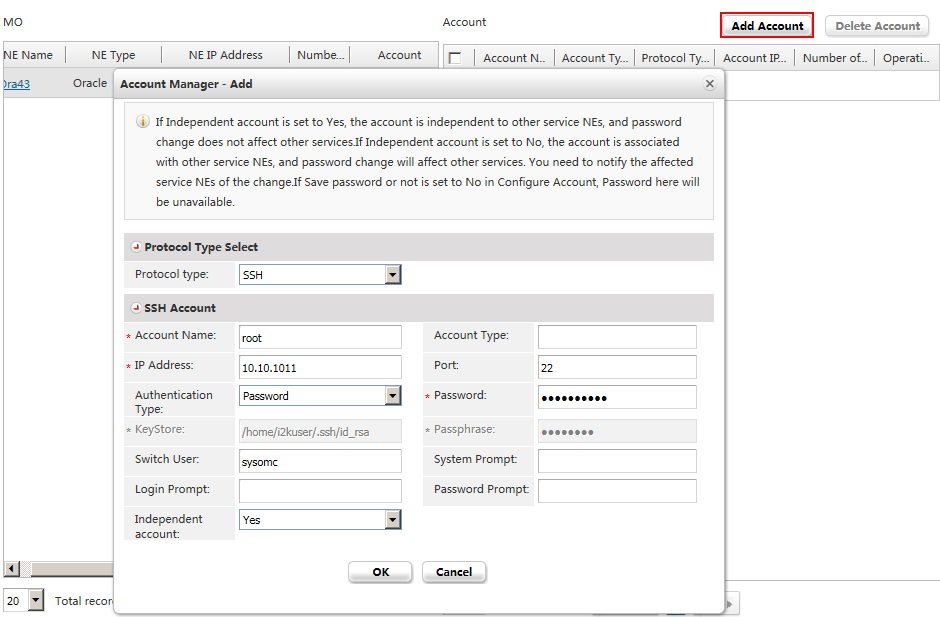
- Click Add Account and add account
information, as shown in Figure 1.
 NOTE: You need to add at least four accounts of two types. For the SSH type, add the root, sysomc, and Oracle accounts; for the DB type, add the database account whose password needs to be changed. Refer to Table 1 to set parameters for accounts of the SSH type and refer to Table 2 to set parameters for the account of the DB type. Use the default values for the parameters that are not listed in the tables.
Table 1 Adding an SSH account Parameter
Configuration
Protocol Type
SSH.
Account Name
Set this parameter to root, sysomc, and Oracle respectively.
IP Address
Set this parameter to the IP address of the board whose database account password needs to be changed.
Authentication
Select Password from the drop-down list box.
Password
Set this parameter to the old password.
Switch User
- You do not need to set this parameter for the sysomc account.
- Set this parameter to sysomc for the root and Oracle accounts.
- Add a password change task.
- Choose from the main menu. In the navigation tree, choose Change Password.
- Click Create to create a task.
- Choose under MO Type.
- Select the matching NE under MO based on the IP address of the board where the Report database is
located.
The accounts added in 2 are displayed.
- Select the account whose password needs to be changed
and click Next.
NOTE: Select only the database account whose password needs to be changed. Do not select the root, sysomc, or Oracle account whose password does not need to be changed. To change the root, sysomc, or Oracle account password, create a separate task.
- Enter the new password twice as prompted and click Next.
The Select broadcast range page is displayed.
- Click Next directly on the Select broadcast range page.
The Confirm task information page is displayed.
- Set the Task Name parameter,
choose whether to start the task immediately, and click Confirm.
NOTE: For immediate tasks, the passwords are immediately changed for the accounts set in the tasks. For non-immediate tasks, the passwords for the accounts set in the tasks are changed only after you click the icon in the task list.
- Verify the account whose password needs to be changed and the NEs to be broadcast and click OK.
- Click the icon next to the task in the task list to start
the task.
If Completed is displayed in the Status column, the task is executed successfully.
If Failed is displayed in the Status column, the task fails to be executed. After a task is executed, you can click the link in the Procedure column of the task list to view detailed password change results and logs.
NOTE: If a task fails to be executed multiple times because the I2000 restarts or the network is interrupted during task execution, and the password change log indicates that the passwords of the account do not match, log in to the NE to check whether its passwords are changed successfully.